Car care without the guesswork

Your AI Car Mechanic
in Your Pocket

Chat with an AI that truly knows your car. Diagnose issues, plan maintenance, and finally understand what's going on under the hood. Pair a Bluetooth LE OBD-II adapter for live sensor data. No proprietary hardware. Works with virtually any vehicle, on iPhone and Android.

Free to download. No credit card required.
Works on virtually any vehicle
Advanced AI, no training needed
Standard OBD-II adapter, no proprietary hardware (Bluetooth LE on iPhone, any transport on Android)
Download on the App StoreGet it on Google Play
  • Works on virtually any vehicle
  • Advanced AI, no training needed
  • No proprietary hardware required
  • iPhone and Android ready
  • OBD-II compatible

What it does

Mechanic-level insight.
In your pocket.

A suite of tools built around how real drivers use their vehicles - whether your car is running perfectly or you need answers fast.

Premium marks paid-plan features; Optional Hardware features pair with a standard OBD-II adapter. Everything else is available on every plan.

Kaiju AI Chat

Ask anything about your car in plain English. Kaiju Mechanic understands your vehicle’s history, connected OBD-II data, and service records, so the answers are specific to your car, not generic advice from the internet. Free accounts include 15 AI credits per month.

Maintenance Tracking

Build a complete service history for every vehicle you own. Log oil changes, brake jobs, tire rotations, or any repair, with date, mileage, cost, and notes. The app tracks upcoming intervals and flags overdue maintenance so nothing slips through the cracks. Manual logging is free forever with unlimited records.

Document Scanning

Point your camera at any service receipt, repair estimate, or maintenance sticker. AI vision reads it and files the details (shop, date, mileage, work performed, parts, cost) directly into your vehicle’s service history. No manual entry.

Photo Analysis

Sometimes a picture is worth a thousand words. Photograph worn tires, rust, a leaking hose, or brake pad wear, and let AI vision identify the component, assess the severity, and tell you what to do next. No guessing. No jargon.

Optional Hardware

OBD-II Live Data

Pair a standard ELM327 OBD-II adapter (Bluetooth LE on iPhone and Android, plus Wi-Fi and Bluetooth Classic on Android, widely available at consumer electronics prices) and get a live dashboard of engine data: RPM, coolant temperature, intake airflow, throttle position, O2 sensor readings, and every active or pending fault code, all interpreted in plain English by the AI. Requires a 1996+ vehicle.

Premium

Multi-Vehicle Garage

Add every car you own or care for. Each vehicle gets its own profile, service history, and AI context, so when you ask about your project car, the answers are specific to that car. Perfect for households, enthusiasts running a daily driver alongside a build, or anyone juggling more than one vehicle.

Optional HardwarePremium

Tune & Flash History

Every tune and dealer reflash leaves a fingerprint in the ECU. Kaiju Mechanic reads that fingerprint on your first scan and stores it as your baseline, then flags any change on later scans, so you can track your own tune history and catch unauthorized flashes between service visits. There is no factory database to compare against, so a first scan tells you what the ECU looks like now, not whether it is stock. Requires an ELM327 OBD-II adapter (Bluetooth LE on iPhone, any transport on Android) and a 1996+ vehicle.

Vehicle Media Library

An organized digital archive for every vehicle. Store photos, scanned documents, modification records, and service receipts in one structured library, and AI categorizes each upload automatically. Browse by category, timeline, or shop, and search to surface any record in seconds. When you sell a car or file a warranty claim, the history is already organized and searchable instead of scattered across a glovebox.

Modifications Tracking

Log every modification to your vehicle, from intake, exhaust and suspension to ECU tunes, with parts, costs, install dates, and photos. Record the horsepower, torque and weight change each mod makes, marked Estimated or Measured, and keep a detailed build record of what was fitted, when, and what it cost.


Simple by design

Up and running in three steps

An AI that knows your car interprets live OBD-II sensor data from a standard ELM327 adapter you bring (Bluetooth LE on iPhone, any transport on Android). No proprietary hardware required.

  1. Download the App

    Create a free account to start tracking maintenance and get 15 AI credits a month, synced across your devices. Free to download on the App Store and Google Play.

    Get the app
  2. Add Your Vehicle

    Type your VIN to fill in the year, make and model, or pick them and the trim from our curated database. You can also connect an OBD-II adapter to auto-detect your vehicle.

    See recommended adapters
  3. Get AI Guidance

    Ask anything - maintenance advice, symptom diagnosis, modification ideas, performance tips, or help understanding your live engine data.

See it in action

A 1:42 walkthrough of the app. Opens on YouTube.

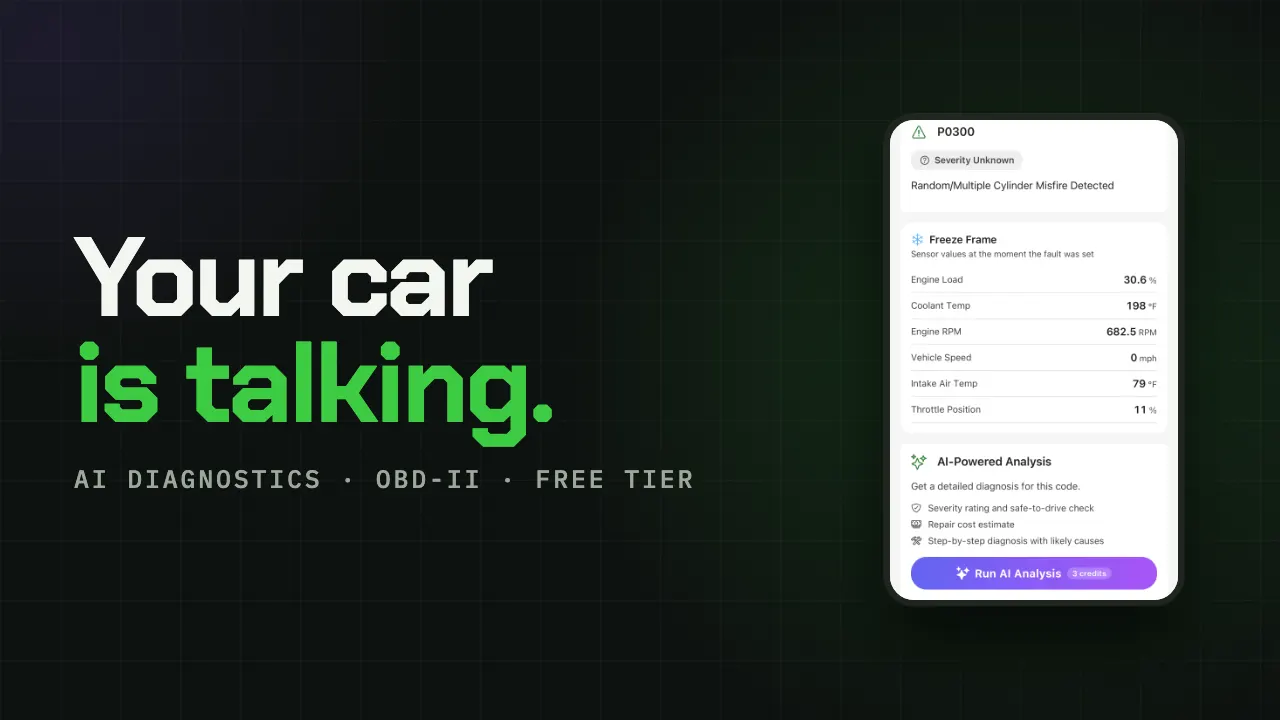
Demo video thumbnail: "Your car is talking." beside the app showing a P0300 misfire code with freeze-frame data.

See it in action

Built for vehicle owners, not mechanics

Dashboard

How we compare

See the difference for yourself

Side-by-side features, then decide if Kaiju Mechanic is the smarter alternative.

Kaiju Mechanic

8/8
  • YesAI-Powered Diagnosis
  • YesWorks on virtually any vehicle (OBD-II: 1996+)
  • YesNo proprietary hardware required
  • YesNatural language chat
  • YesDocument scanning
  • YesPhoto analysis
  • YesMaintenance tracking
  • YesMulti-vehicle support

Dealer Diagnostic

3/8
  • NoAI-Powered Diagnosis
  • YesWorks on virtually any vehicle (OBD-II: 1996+)
  • NoNo proprietary hardware required
  • NoNatural language chat
  • NoDocument scanning
  • NoPhoto analysis
  • YesMaintenance tracking
  • YesMulti-vehicle support

Generic OBD App

2/8
  • NoAI-Powered Diagnosis
  • YesWorks on virtually any vehicle (OBD-II: 1996+)
  • YesNo proprietary hardware required
  • NoNatural language chat
  • NoDocument scanning
  • NoPhoto analysis
  • NoMaintenance tracking
  • NoMulti-vehicle support

Simple pricing

Start free. Upgrade in-app.

No checkout on this site. Download the free app, then upgrade from inside the app via Google Play or the App Store if you want more.

Free

Try Kaiju Mechanic risk-free.

FreeRisk-free
15 credits/mo. AI features use credits. See in-app credit usage for current per-action costs.1 vehicle500 MB cloud
  • 15 AI credits per month
  • 1 vehicle profile
  • OBD-II fault code reading
  • Manual maintenance logs (unlimited records)
  • Add services to your schedule (presets or a custom name)
  • 500 MB cloud storage included
  • No credit card required
Download Free
MOST POPULAR

Premium

Everything you need to own any vehicle, fully.

$79.99/yr

26% off — 3 months free

300 credits/mo. AI features use credits. See in-app credit usage for current per-action costs.∞ vehicles5 GB cloud
  • 300 AI credits per month (20× the free allowance)Upgrade perk
  • Unlimited vehicles
  • Tune & Flash History: flag ECU firmware changes since baseline
  • Personalized AI maintenance schedules
  • 5 GB cloud storage (add-ons available)
Download & Subscribe
Cancel anytime

Common questions

Got questions?

General

Product Features

Ready?

Your car deserves better
than guessing.

Download Kaiju Mechanic free and start your first AI conversation in minutes. No appointment. AI chat works without an adapter. Live sensor reads use a standard ELM327 you bring. Bluetooth LE on iPhone or any transport on Android. Just answers.

Download on the App StoreGet it on Google Play
Free to download. No credit card required.

On Instagram

Latest on Instagram

Follow @kaijumechanic
  • Something feels off with the car? Describe it like a pro. 1. When does it happen? Cold start, braking, turning, every time or sometimes. 2. What do you notic…
  • 5 checks after driving in salt. 1. A rinse underneath, including the wheel wells. 2. A look at packed slush around wheels and lines. 3. Wipers and washer flu…
  • Selling or trading in? Clear your data out of the car first. 1. Unpair your phone and clear synced contacts and call history. 2. Clear home, work and recent …
  • 5 steps to log a mod the right way. 1. Name the part that went on. 2. Note what came off. 3. Add the date and mileage. 4. Shoot before and after from the sam…
  • Buying used? 5 questions for the seller. 1. Why are you selling? A clear answer is a good sign. 2. Can I see the service records? Dates and mileage tell the …
  • 5 things to log after a shop visit. 1. The invoice: date, shop, mileage, what was done. 2. Parts and fluids that went on the car. 3. Anything recommended tha…